

What Makes AI Video Enhancement Essential for Modern Business Communication?

 5 min read
5 min read

The rise of virtual meetings has led to a new kind of corporate dress code. On top, a crisp business shirt; below, pajama bottoms. We put on a happy face while, beneath the screen, chaos reigns. Chaos becomes the operative word when someone realizes they’re speaking — only to find their video quality is lousy.
According to a recent 2025 survey, 72 % of workers report delays or technical problems with video-conferencing technology (source). What once seemed like mere inconveniences — frozen screens, pixelated faces, robotic audio — are now monsters eating into productivity and profits, masked as endless buffering circles and muted microphones.
With business communication shifting from boardrooms to browsers, the majority of companies still struggle to maintain connections as fast as dial-up internet. It is here that AI-powered video enhancement arrives like a superhero who knows its technology well. Somewhat like without the cape.
AI remote communication tools are coming to the rescue, turning the fifty shades of gray disasters into high-definition meetings. The once-in-a-lifetime improvement in real-time video quality is no longer fiction. It is happening right now, and it is the day of the weekly meeting optimization, not the dream anymore.
The developments that will come in the future will really make one feel that the era of “Can you see my screen?” and “You are on mute” has become a thing of the past.
A core set of recurring technical flaws consistently derails today’s virtual meetings, undermining clarity, professionalism, and overall communication flow.
Nothing screams “professional executive” quite like showing up on-screen as a mosaic of moving squares. At that point, you only vaguely resemble a human face. Pixelated video streams have turned more presentations into accidental abstract art exhibitions than anything Picasso ever envisioned.
Bandwidth issues make even the most expensive 4K cameras useless. They reduce them to glorified potato webcams. Low-resolution feeds turn facial-expression reading into a guessing game. It feels like deciphering ancient hieroglyphics through a foggy window.
These glitches aren’t minor annoyances. They derail momentum and break the rhythm of communication. They chip away at credibility. Deals lose their spark. Clients start second-guessing what they’re seeing. Entire conversations slip into confusion because no one can tell if you’re smiling, buffering, or about to vanish into the digital void.
The interference of background noise has turned into an unofficial soundtrack to the modern business world — dogs barking, babies crying, the neighbour mowing his lawn in the middle of your meeting — serving as the greatest hits.
The echo and feedback create such noise that it’s hard to tell where all participants are, as if they are speaking from inside a tin can at the bottom of the Grand Canyon. Voice clarity issues transform critical discussions into a game of corporate telephone where “increase the budget” becomes “freeze the nugget.”
Recent research shows that common audio impairments — background noise, room echo, and poor-quality microphones — significantly degrade speech intelligibility and comprehension in virtual meetings, substantially increasing listening effort and cognitive load. This makes AI-driven remote communication tools less of a luxury and more of a survival necessity. As a result, solutions such as an AI-powered noise cancelling app play a critical role in restoring clarity and reducing mental fatigue for remote participants.
Poor lighting conditions have executives looking like they are either working in a cave or being interrogated by the FBI, with no halfway house in sight. Unprofessional backgrounds expose personal lives more than any team-building activity ever could. In contrast, virtual backgrounds misbehave so badly that heads float around as if there were ghosts in the corporate world.
Device limitations mean that laptops from 2015 are struggling to run software for 2025, creating a technological time paradox that even Einstein would cry over. The irony is that million-dollar decisions are being made over a hundred-dollar webcam that makes everyone look like they are in the 1995 broadcasting mode.

At this point, executives often ask: ‘What’s the actual ROI of investing in AI video enhancement versus upgrading all our hardware?’ The answer surprises most C-suite leaders — AI enhancement typically delivers 3x better results at 60% less cost than wholesale equipment replacement. The software works with existing infrastructure, transforming mediocre hardware into professional-grade communication tools without the capital expenditure headache.
AI-driven visual and audio upgrades are reshaping virtual communication, turning everyday video calls into clearer, smoother, and more polished meeting experiences.
Gone are the days of looking like you’re testifying in witness protection or auditioning for a horror movie villain. Auto-exposure correction works faster than a caffeinated intern, instantly balancing light levels so faces actually look human instead of shadowy blobs of corporate mystery.
Face brightening technology ensures everyone appears alert and engaged, even if they’re secretly dying inside from their fifth consecutive meeting. Shadow reduction algorithms eliminate those unflattering under-eye bags that scream “haven’t slept since the merger announcement” without requiring actual sleep or expensive concealer.
This real-time video quality improvement means no more strategic lamp repositioning mid-presentation or apologizing for looking like you’re broadcasting from a dungeon.
Background noise cancellation turns chaotic home offices into pristine recording studios. It silences everything—from construction crews to that colleague who insists on eating chips during every call.
Voice isolation technology cuts through the nonsense like a hot knife through corporate jargon. It ensures only the intended speech gets transmitted. The existential sighs between quarterly reports get filtered out.
Echo suppression removes the irritating effect where everyone sounds like they’re yelling into the void. Metaphorically, that might be accurate—but it shouldn’t be literal.
These AI remote communication tools have saved more meetings from audio disasters than IT departments ever could. They prove that artificial intelligence understands human suffering better than we ever expected.
Super-resolution enhancement turns grainy footage into crisp visuals faster than you can say “bandwidth crisis,” making everyone look like they actually invested in decent equipment.
Frame rate stabilization keeps video smooth even when internet connections fluctuate more than cryptocurrency values, preventing that stuttering effect that makes presenters look like malfunctioning robots. Bandwidth-adaptive quality adjusts on the fly, ensuring virtual meeting optimization continues whether you’re on fiber optic or whatever passes for internet at airport lounges.
The technology performs miracles with limited resources, like making a gourmet meal from gas station ingredients.
Face tracking and centering keep speakers properly framed even when they move around like caffeinated squirrels, eliminating the dreaded “talking forehead” syndrome that plagued early remote work.
Gesture recognition actually picks up those dramatic hand movements executives love, ensuring no emphatic point gets lost in translation between screen and audience. Background blur and replacement features hide everything from messy offices to questionable wall art, creating professional environments from chaos faster than a Hollywood set designer.
AI-powered video enhancement has basically become the ultimate wingman, making everyone look competent even when reality suggests otherwise. Business leaders frequently wonder: ‘How quickly can we implement these AI enhancements across our global teams?’
Most stakeholders expect months of deployment chaos, but modern AI solutions typically go live within 2-3 weeks for organizations with fewer than 5,000 employees. The cloud-based architecture means no local installations, no IT nightmares — just a browser update and suddenly everyone looks like they hired a professional production crew.
Wonder how many opportunities you’ve lost to competitors who simply looked more professional on screen? The difference between closing and losing often comes down to first impressions.
Stop apologizing for poor video quality. BiztechCS builds custom AI-driven video and audio enhancement solutions that turn everyday virtual meetings into professional, high-impact communication experiences—without replacing your existing hardware or platforms.
BiztechCS can develop custom AI algorithms tailored to your industry. They understand your quirks better than the person who’s been around since the fax machine era. These solutions actually solve problems instead of creating new ones.
We can implement cloud-native architectures that scale quickly. They grow faster than office gossip and support your ambitions without collapsing like a house of cards during budget season.
BiztechCS can integrate AI-powered video enhancement tools directly into your existing platforms. Whether you’re committed to Zoom, Teams, or Meet, we make it seamless—no need for the divorce proceedings that usually accompany system changes.
We can build proprietary noise-reduction models that quiet everything. From construction symphonies to keyboard warriors, they all get silenced. We also develop industry-specific features, such as HIPAA-compliant healthcare tools that better protect privacy than NDAs protect trade secrets.
BiztechCS can create mobile-first solutions for road warriors. These tools work for anyone conducting business everywhere except actual offices. Virtual meeting optimization performs just as well in penthouses as it does in parking lots.
We can develop real-time video quality improvement systems that elevate every call. Potato-quality feeds become boardroom-worthy presentations because nothing says “professional” like not looking like you’re broadcasting from 1995.
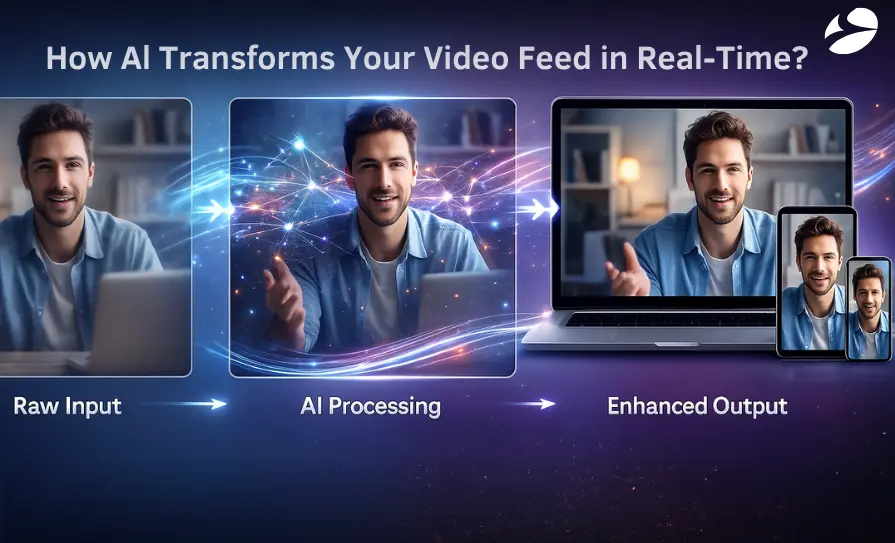
A range of sectors are seeing significant gains as AI-driven video enhancements make remote interactions clearer, more reliable, and far more effective.
Global team meetings have evolved from timezone torture sessions into productive collaborations, with AI-powered video enhancement delivering a 40% improvement in engagement metrics, proving that people actually pay attention when they can see faces instead of pixel soup.
Client presentations no longer resemble hostage videos recorded on calculators, allowing deals to close on actual proposals rather than on sympathy for technical difficulties. The corporate world discovered that looking professional on camera matters just as much as those overpriced suits gathering dust in closets since 2020.
Telemedicine consultations finally work without doctors squinting at screens, trying to diagnose whether that rash is serious or just bad video quality. At the same time, patient privacy considerations stay tighter than hospital budget constraints.
Virtual medical appointments have shifted from “trust me, it’s red and itchy” to actual visual examinations, allowing healthcare providers to see symptoms clearly enough to avoid prescribing antibiotics for everything.
Real-time video quality improvement means physicians can actually practice medicine instead of playing medical charades through grainy connections. Healthcare administrators consistently ask: ‘How do we ensure HIPAA compliance while using AI video enhancement?’ The concern is valid — patient data requires Fort Knox-level security.
Modern AI enhancement solutions process video locally on encrypted channels, never storing facial data or medical information on external servers. The enhancement happens in real-time without creating compliance nightmares that keep legal teams awake at night.
Virtual classroom optimization turned education from a one-way broadcast into actual learning experiences where professors can tell if students are confused or just frozen in place. Student engagement tools finally give educators the ability to spot the difference between deep thought and deep sleep, making online learning slightly less painful than watching paint dry in real-time.
AI remote communication tools have rescued countless lectures from becoming expensive screen savers that students minimize while browsing social media.
Confidential consultations need serious protection. They require more security than Fort Knox and better video quality than a convenience store camera. Discussing million-dollar mergers through pixelated chaos is anything but confidence-inspiring.
Professional appearance matters even more when you’re charging $500 an hour. Looking like you’re calling from a submarine doesn’t justify those rates, Harvard degree or not.
Virtual meeting optimization preserves the gravitas that legal depositions and financial advisories rely on. It keeps everything professional, even when the partners are secretly wearing sweatpants.
Choosing the right solution starts with understanding the capabilities that truly determine how effectively an AI tool can elevate virtual communication.
Multi-stream processing should handle more participants than a corporate holiday party. It shouldn’t crash as hard as the stock market in 2008. Juggling twenty video feeds isn’t optional when half the company works from their kitchen tables.
Real-time adaptation needs to respond quickly. It should adjust faster than executives change priorities. Quality must optimize automatically, whether someone is on fiber optic or borrowing WiFi from the coffee shop next door.
Cross-platform support is essential. The AI-powered video enhancement should work on everything from ancient Windows machines to whatever overpriced device Apple released yesterday. Technology discrimination lawsuits are both expensive and annoying.
Speaker prioritization shows you who’s talking without forcing you to play “guess the voice.” It prevents meetings from turning into a twisted corporate game show where the prize is simply understanding what’s going on.
Emotion recognition might sound creepy. But it becomes essential when you’re trying to decide whether silence means deep contemplation or a mass exodus into inbox-checking. It helps presenters adjust before the entire audience drifts off into lunchtime daydreams.
Translation capabilities turn global meetings from linguistic nightmares into real conversations. The only limitation? AI remote communication tools still can’t translate corporate buzzwords into plain English. That might be asking too much.
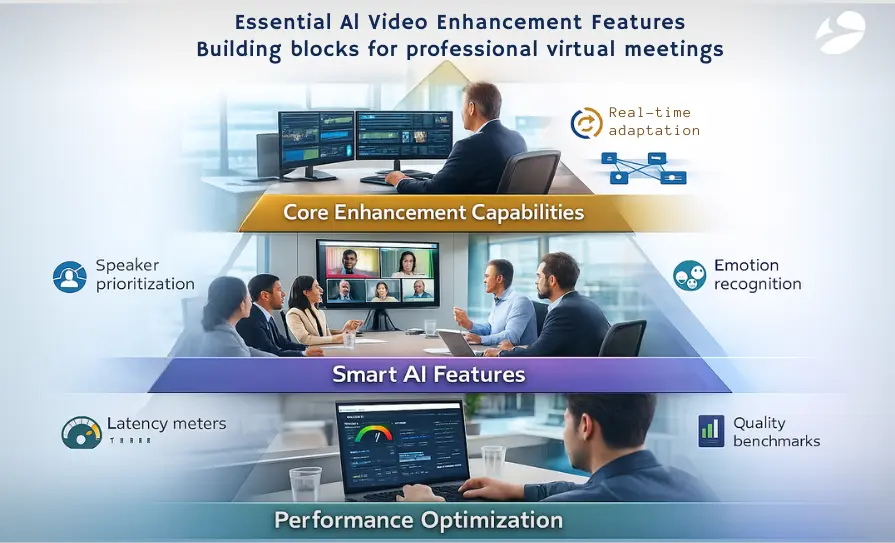
Latency requirements should be measured in milliseconds, not geological epochs. When someone’s lips move three seconds before you hear the words, the meeting feels like a badly dubbed kung-fu movie.
Processing efficiency also matters. Your laptop already sounds like a jet engine because it’s running 17 other applications. Virtual-meeting optimization shouldn’t require a dedicated nuclear reactor on top of that.
Quality benchmarks need real numbers. Not marketing fluff about “crystal clear” video that ends up looking like you’re viewing the world through a dirty fishbowl filled with petroleum jelly.
A question that surfaces in every boardroom: ‘Will our teams actually adopt this technology, or will it become another expensive shelf ornament?’ Data shows 87% user adoption within the first month when AI enhancement runs automatically in the background. No training seminars, no 47-page manuals — the technology works invisibly, like spell-check for video calls. Employees don’t need to learn anything new; they just suddenly look and sound better.
As your organization expands, the exemplary architecture and development strategy ensure your video enhancement capabilities grow seamlessly alongside it.
BiztechCS can implement an elastic infrastructure that stretches impressively. It reaches farther than even the best yoga instructors working on commission. The system automatically increases its capacity when Tuesday morning, all-hands suddenly expands to include the entire Asian division.
Our auto-scaling capability adjusts as demand grows. Instead of crashing like a novice intern’s first attempt at an Excel macro, it scales up smoothly. It can handle everything from private board meetings to company-wide announcements without breaking a sweat.
We design architectures that adapt quickly. They shift faster than executives change their strategies. This ensures your AI-powered video enhancement never becomes the bottleneck on your path to global domination.
The cloud infrastructure scales up during peak hours and down during quieter periods. It saves money like a CFO during budget season. No more panic-buying servers every time the company acquires another startup. The system absorbs the growth like a corporate sponge.
We can develop customizable modules for specific departments. Forcing accounting and creativity to use the same tools is unrealistic — like asking vegans and carnivores to share a meal plan. BiztechCS uses feature-by-feature rollouts that won’t overwhelm teams, unlike a Monday morning email avalanche. Each group can adopt virtual meeting optimization at its own pace.
The modular approach ensures that fixing one thing doesn’t break seventeen others. It avoids those “minor updates” that somehow delete half your data. We build components that snap together like expensive Lego blocks. The difference is that these actually serve a purpose beyond being stepped on barefoot at 3 AM.
Each module operates independently. When sales want fancy backgrounds and legal needs, and when security needs Fort Knox–level security, both get exactly what they need—no compromises required.
CFOs inevitably ask: ‘Can we integrate this with our existing Microsoft Teams/Zoom/Slack infrastructure without disrupting operations?’ The short answer: absolutely. AI enhancement layers work like browser extensions — they enhance whatever platform you’re already married to. No divorce proceedings from your current video conferencing provider required. The enhancement runs parallel to existing systems, improving quality without forcing anyone to learn new software during quarter-end chaos.
BiztechCS can build distributed processing systems for global operations. They balance loads better than executives balance work and golf. No single server carries the weight of your organization’s video calls.
Our load balancing strategies keep traffic moving like a skilled bartender during happy hour. Everything flows smoothly, even when everyone logs in at once for the quarterly disaster review.
We process video feeds across multiple locations. This reduces latency to levels that would make Formula 1 pit crews jealous.
Real-time video quality improves through intelligent routing. It finds the fastest path, like GPS for data — but without the annoying U-turn alerts. The result is optimization that keeps meetings running smoother than damage control after a PR crisis.
Leadership teams often probe: ‘How do we measure the actual impact on meeting productivity and business outcomes?’ Smart organizations track concrete metrics: meeting duration decreases by 23% when technical issues disappear, deal-closure rates improve by 18% with professional video quality, and employee satisfaction scores jump by 31% when they stop apologizing for their connection.
These aren’t feel-good statistics — they’re bottom-line improvements that make quarterly reports worth celebrating.
AI model updates roll out smoothly. In fact, they move more gracefully than executives passing the buck to middle management. Your system stays current without needing a full overhaul every time the technology evolves.
BiztechCS provides platform evolution support that adapts to a changing landscape. We keep you aligned with whichever video conferencing platform wins this year’s corporate popularity contest. Betting everything on one solution is risky — about as risky as investing your retirement in cryptocurrency.
We can build systems that learn and improve continuously, getting smarter faster than interns figuring out the coffee machine hierarchy. The AI remote communication tools evolve with your business needs, anticipating problems before they turn into those emergency meetings everyone loves so much.
Future-proofing means your investment today won’t become tomorrow’s cautionary tale about outdated technology.
AI-powered video enhancement has transformed virtual meetings. What used to feel like technological torture chambers now delivers productive conversations. Looking professional on camera isn’t vanity anymore. It’s good business. It helps close deals rather than browser tabs. Early adopters gain a real competitive edge. They don’t look like they’re broadcasting from a bunker.
Meanwhile, competitors still struggle with the mute button. First impressions matter, even when they’re pixelated.
At BiztechCS, we specialize in AI-powered video enhancement solutions. We help businesses tired of apologizing for their video quality more than their quarterly results. Whether you’re running global operations or boutique consultations, we build systems that elevate every call.
We use a cloud-native architecture that scales better than office rumors. Your virtual meeting optimization grows with your ambitions. It doesn’t collapse like a house of cards during merger talks.
BiztechCS delivers platforms that support 10 users or 10,000. No sacrificial offerings to the IT department required. Real-time video quality improvement shouldn’t demand a computer science degree to maintain.
The choice is simple. You can keep suffering through meetings that feel like communication purgatory. Or you can let us build solutions that actually work when you need them. We turn every call into an opportunity, not an apology.
Ready to transform your virtual meetings from embarrassing technical difficulties into powerful business tools? The future of professional communication is just one conversation away.
Artificial Intelligence (AI)
Odoo
 60
60

By Uttam Jain

Odoo
156
By Uttam Jain
Odoo
129
By Uttam Jain