

Odoo Customization Services: Why One-Size-Fits-All ERP Never Works
 5 min read
5 min read
Only 3%
Of businesses run their ERP completely out-of-the-box with zero changes — meaning 97% of Odoo deployments involve some level of customization, configuration, or both
23%
Of ERP implementation failures are directly attributed to over-customization, not too little customization, but too much, building complexity that compounds with every future upgrade
15–25%
Of the original build cost per year is the recurring annual maintenance burden carried by custom software, a $25,000 custom module costs $3,750–$6,250 per year to maintain indefinitely.
~37%
Lower implementation cost for businesses that minimize customization vs. heavily customized deployments, and they retain the upgrade agility to adopt new Odoo features each annual release
Only 3% of businesses run their ERP with zero changes. The other 97% customize, and that makes sense. No two businesses share the same workflows, approval chains, or reporting requirements.
But 23% of ERP implementation failures trace directly to over-customization. Not too little, too much. Businesses that customize everything end up recreating the complexity of the system they were replacing, then paying to maintain that complexity through every future upgrade cycle.
The problem isn’t customization itself. It’s customization without a framework. The gap between an Odoo deployment that delivers five-year ROI and one that becomes a maintenance burden almost always comes down to how customization decisions were made in the first place, and whether anyone pushed back when pushing back was the right call.
Most buyers use “configuration” and “customization” as if they mean the same thing. The technical distinction has direct financial consequences that show up years after go-live.
Configuration is using Odoo’s built-in settings to match business requirements. Tax rules, user roles, approval stages, multi-currency handling, warehouse routing, reordering rules, all of this is configurable without writing a line of code. When Odoo releases a new version, configuration moves forward automatically. The ongoing maintenance cost is zero.
Customization is writing new Python, XML, or QWeb code to handle requirements that configuration genuinely can’t meet. That code lives in a custom module. It works exactly as specified, and it also needs to be reviewed, tested, and often rewritten with every Odoo major version release. Odoo releases annually. The maintenance cost is real, recurring, and compounds when upgrades get deferred.
Odoo Studio is the middle option, a no-code tool available on the Enterprise plan that lets you add fields, rearrange layouts, build simple automations, and edit report templates without developer involvement. Studio is the right answer for many UI requirements and straightforward workflow adjustments. The limitation: Studio changes are stored in the database rather than version-controlled code, which makes rollback, peer review, and upgrade management harder than a properly structured custom module. Studio can’t handle complex logic, new data models, or two-way integrations.
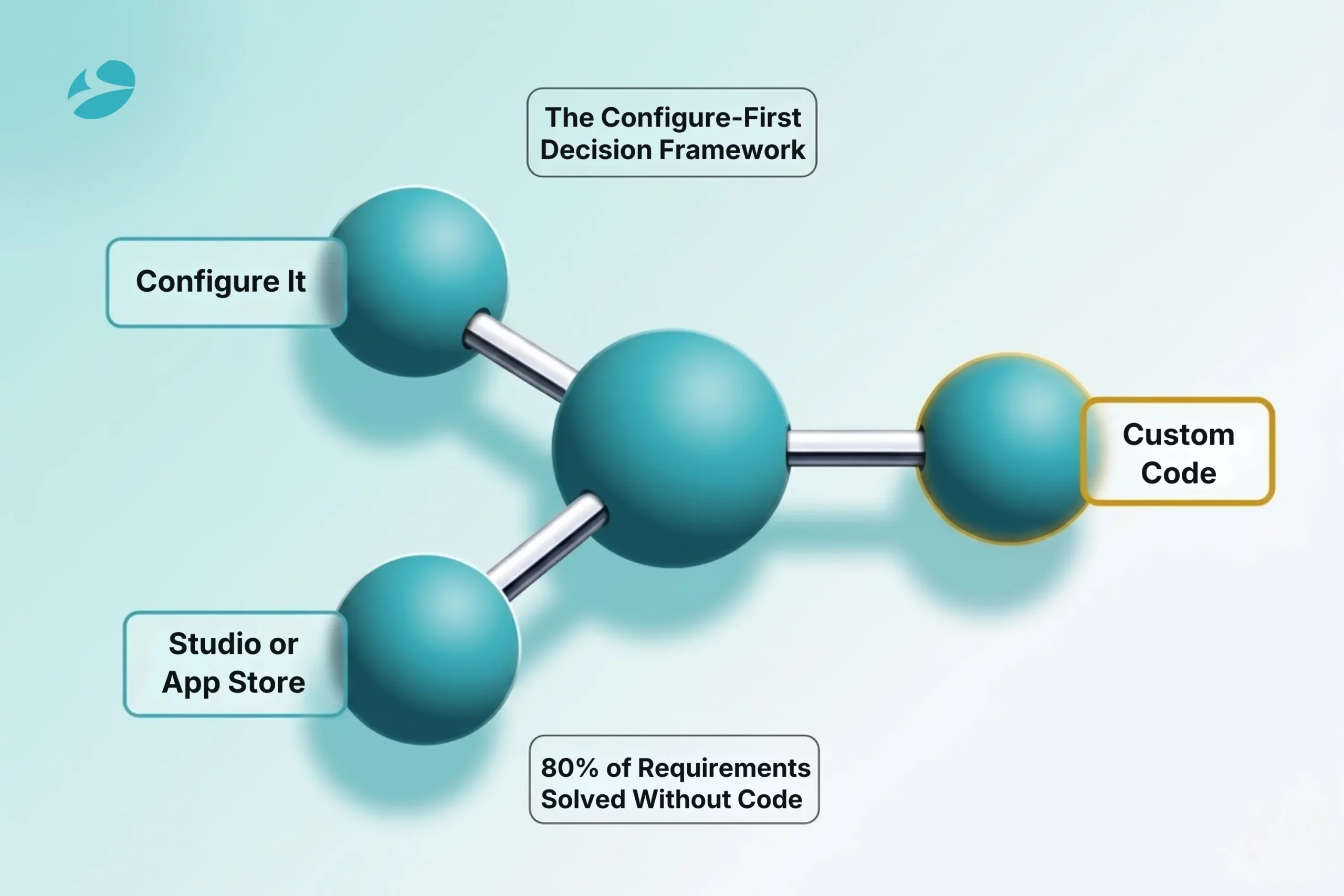
The rule experienced Odoo partners apply before opening a code editor: configure first. If built-in settings solve it, there is nothing to maintain. Use Studio for low-complexity UI and simple single-step automations. Reserve custom development for the workflows that genuinely require new code, and before commissioning that development, check Odoo’s App Store. A pre-built module covering 90% of the requirement is almost always cheaper than custom development over a five-year horizon.
Understanding what each Odoo customization services type involves, and what maintaining it actually costs, changes how the conversation starts.
Uses Odoo’s inheritance system to add fields, change views, or alter behavior within an existing module without touching Odoo’s core files. The changes live in a separate custom module layered on top of the standard code. When built this way, version upgrades require targeted updates to the custom layer, not a rewrite of the underlying feature. This is the most common type of customization: adding fields to sales orders or purchase requests, modifying invoice behavior, extending existing workflow stages.
Building entirely new functionality that Odoo doesn’t provide. A new data model, a new business process, a new reporting entity that doesn’t correspond to anything in Odoo’s standard module set. The most flexible option and the most expensive to build and maintain. The right answer for genuine competitive differentiation: an industry-specific workflow, a regulatory compliance requirement, a process unique to the business. The wrong answer for things Odoo already does that the team hasn’t fully explored.
Two tiers. Studio handles field placement, tab organization, label changes, and basic role-based field visibility, enough for most interface requirements. Code-based customization using Odoo’s OWL JavaScript framework produces reactive dashboards, conditional rendering, and custom widgets that Studio cannot. A simplified work order screen that removes irrelevant fields for shop floor operators reduces training time and input errors. An over-engineered interface that the team eventually routes around delivers nothing regardless of the development cost.
Studio handles basic PDF layout adjustments: logo placement, font changes, adding a field to an existing document. Any report with conditional sections, multi-level subtotals, complex multi-page layouts, or government-mandated formats, e-invoicing, ZATCA, GST, customs declarations, requires QWeb code. The most common complaint from businesses that skipped proper report customization: invoices that look unprofessional, or regulatory documents that get rejected on submission.
Connecting Odoo to external systems, payment gateways, eCommerce platforms, shipping carriers, bank feeds, warehouse management systems. Studio supports basic outbound webhooks. Two-way data sync with error handling, retry logic, and complex field mapping always requires developer code. Integration customization is the category where scope grows most unexpectedly: the initial requirement seems contained, and then the edge cases (partial fulfillments, return orders, multi-currency) each add scope and cost.
Studio automated actions cover basic triggers: set a field, send an email, create a follow-up activity when a record enters a specific state. Python server actions handle compound conditionals, cross-model dependencies, multi-step approval routing with exception handling. The common mistake: assuming Studio covers the automation requirement, discovering mid-project that the specific logic needs code, and adjusting scope and budget after discovery rather than before.
Every customization request should pass through four questions before a developer opens a code editor.
1
Odoo’s configuration layer is deeper than most users realize before they’ve worked with a certified partner. Tax rules, fiscal positions, multi-currency, intercompany rules, warehouse routes, reordering rules, manufacturing BOMs and routings, payroll rules, CRM pipeline stages, sales pricelist logic, all configurable without code. Teams that request customization before spending structured time in Odoo’s settings tend to underestimate what’s already there. If built-in configuration covers the requirement, the answer is always configuration.
2
If the requirement is field placement, label changes, basic tab organization, simple single-condition automations, or standard email triggers, Studio is the right tool. The important qualification: Studio should be evaluated with upgrade considerations in mind. For changes that will be business-critical or touched frequently, code-based custom modules with proper version control are more defensible over time than database-stored Studio changes.
3
Before commissioning custom development, the App Store needs a real review, not a 30-second check. For common requirements (specific regulatory formats, standard third-party integrations, industry-specific features), pre-built modules exist that are built and maintained by specialized Odoo partners. A pre-built module covering 90% of the requirement costs a fraction of custom development and carries no internal maintenance burden. Custom code should only be the answer when no App Store alternative exists or when the requirement is genuinely specific to the business.
4
The question most teams skip. Recreating a legacy system’s behavior in a new ERP isn’t competitive advantage, it’s automating processes that may have been wrong for years. A workflow the business has run for 15 years because “that’s how we do it” is a candidate for process review before it’s a candidate for customization spec. The businesses that achieve the strongest ERP ROI consistently use implementation as an opportunity to improve processes rather than replicate them.
The 80/20 principle as a planning target: 80% of business requirements should be solved through Odoo’s standard configuration and features. The 20% that can’t be, and that represents genuine operational differentiation, is where customization investment is justified.
The business case for strategic customization is real when the scope is right.
Financial close cycles improve when accounting workflows match how the finance team actually operates. When the ERP eliminates manual handoffs and automates reconciliation steps that the team was doing manually, close cycle time drops, in some cases by 50%. Inventory carrying costs fall when warehouse and replenishment workflows reflect real operational patterns rather than generic defaults. Training time decreases when the interface users see every day is simplified for their role, showing the fields they use and not the full feature set they don’t. Research on UI-fit in ERP adoption finds training time reductions of up to 80% when the system was built around real user workflows rather than the vendor’s default layout.
The businesses that achieve these outcomes tend to share one characteristic: they treated customization as a deliberate strategic choice, not an open-ended development queue. Businesses that minimize customization to what’s genuinely necessary save approximately 37% on implementation costs compared to heavily customized deployments. They also maintain the upgrade agility to absorb new Odoo features each annual release, rather than discovering that the new capability they want conflicts with modifications built four versions ago.
The businesses that don’t reach this ROI are almost always the ones that customized reactively. Each department made individual requests. Nobody evaluated whether the process should change instead of the software. Nobody mapped the downstream upgrade implications. By year two, the implementation that was supposed to simplify operations had become the most complicated system in the organization, and the most expensive to maintain.
The most expensive customization mistake, and the most common. Teams build a requirements list that mirrors exactly how the old system worked, not because those workflows were right, but because they’re familiar. The partner builds it faithfully. At go-live, the business runs the new Odoo system the old way, with new licensing costs, full implementation costs, and now an ongoing maintenance burden attached to every legacy-behavior customization they built.
The right question before any customization spec is written: “Should this process change, or should the software match it?”
Odoo’s standard modules contain years of accumulated functionality that most users never fully explore before requesting customization. One structured walkthrough of Odoo’s native CRM configuration with a certified consultant typically eliminates 30–40% of the customization requests that came in during initial discovery. Teams that skip this step pay twice: once to build something that already exists, and once per version upgrade to maintain it.
Custom code without documentation is a business continuity risk that compounds over time. When the developer who built the customization leaves, the organization inherits code nobody can safely modify. Every version upgrade becomes a reverse-engineering exercise. Every new partner has to reconstruct the intent of each modification before they can assess upgrade compatibility. Documentation, what each module does, why it exists, what it connects to, what tests cover it, should be a contractual deliverable from day one, not an optional add-on.
A partner who approves every customization request without questioning business necessity isn’t protecting the client’s interest. They’re building billable hours while transferring all long-term maintenance responsibility to the client. The signal to look for: does the partner ask whether native settings could solve this? Do they suggest Studio before recommending custom development? Do they raise the upgrade implications of each proposed customization before committing to build it? Pushback from a partner is a quality signal.
Without a formal intake and review process, department heads have uncoordinated access to request system modifications. Each request seems small on its own. Cumulatively, they expand scope, introduce conflicts between customizations, and build a maintenance burden that grows silently until the next upgrade makes it visible and expensive. A governance process requires: a written business justification, a native-capability check, an upgrade-impact assessment, and technical review before any development starts.
Odoo releases a major new version every 12 months. Each release brings features, performance improvements, and security patches. Each custom module in the system requires a compatibility review, and often rework, with every release.
The math is direct: 10 custom modules means 10 compatibility checks per year, every year, indefinitely. Annual maintenance costs for custom software run 15–25% of the original build cost per year. A $25,000 custom module costs $3,750–$6,250 annually to maintain. A $100,000 customization stack carries a $15,000–$25,000 per-year maintenance commitment before accounting for version upgrade work.
The compounding cost hits when upgrades are deferred. Each skipped Odoo version increases upgrade complexity by approximately 1.5×. A business that skips three versions doesn’t face a manageable upgrade, it faces a project comparable in scope and cost to the original implementation. And since March 2026, Odoo charges a 25% subscription surcharge to customers running versions three or more releases behind the current version. That penalty falls hardest on the businesses that deferred upgrades specifically because their heavy customization made upgrading too expensive to justify.
This is customization debt: the ERP-specific form of technical debt. The symptoms are predictable. Upgrades keep getting pushed because the retest cost is prohibitive. The original implementation partner is the only person who fully understands the system. New Odoo features conflict with existing modifications. Annual maintenance costs exceed what the original customizations were worth in business value.
The path out is a customization audit: inventorying every modification, assessing upgrade safety, retiring redundant code, and putting a governance process in place before the next request cycle begins. BiztechCS runs customization audits as a standalone engagement for businesses that have inherited complex Odoo deployments, or for businesses that want to reduce their maintenance exposure before the next major upgrade.
The right Odoo customization partner doesn’t simply build what they’re asked to build.
They start with a configure-first audit. Before writing code, a competent partner does a structured walkthrough of Odoo’s configuration options for your specific requirements. This step alone eliminates unnecessary development spend. It requires deep platform knowledge, certified Odoo experts bring it; generalist developers often don’t.
They document every deliverable. Each custom module should be delivered with documentation covering what it does, why it was built, what systems it connects to, and what automated tests cover its behavior. This isn’t optional. An undocumented customization is a liability, not an asset.
They built an upgrade-safe. Customizations that use Odoo’s inheritance system, isolated in custom modules, not touching core files, survive version upgrades with targeted updates. Ask any prospective partner specifically how they structure custom development for long-term upgrade safety. The answer reveals how much they’ve maintained their own work over time.
They give you a governance framework. The end of a development engagement should include a process for how future customization requests get evaluated, reviewed for business necessity, assessed for upgrade impact, and approved before development starts.
Their reference clients are in your industry. Odoo customization for manufacturing has different complexity patterns than for professional services or wholesale distribution. A partner who has delivered multiple implementations in your sector knows where the hard problems are before they surface on your project.
BiztechCS is an Odoo Ready Partner with 25+ certified Odoo experts, 19+ years of ERP delivery experience, and ISO 27001 certification. Every customization engagement starts with a configure-first audit. All deliverables include documentation, test coverage, and upgrade-safety review. We push back when pushing back is the right call, and our 98% client retention rate reflects what that discipline delivers long-term.
1
Configuration uses Odoo’s built-in settings to match business requirements, no code, fully upgrade-safe, zero maintenance burden. Customization writes new Python, XML, or QWeb code to handle requirements that configuration genuinely cannot meet. That code carries a recurring annual maintenance cost of 15–25% of the original build cost, every year, for the life of the deployment. Odoo Studio sits in between: a no-code tool for UI changes and simple automations that requires less maintenance than full custom development but has real limitations on complex logic and integrations.
2
Simple UI changes or field additions: $500–$2,000. Code-level workflow automation: $1,500–$6,000. Custom module development: $4,000–$25,000. Multi-module enterprise work with integrations: $25,000–$100,000+. The three biggest cost drivers: complexity of business logic, number of external integrations, and the partner’s hourly rate (certified Odoo partners: $100–$175/hr vs. offshore freelancers: $25–$60/hr). The cost that almost never appears in an initial quote: annual maintenance at 15–25% of build cost, compounding with each deferred version upgrade.
3
Customizations built using Odoo’s inheritance system, isolated in custom modules, not editing core Odoo files, survive version upgrades with targeted rework rather than full rewrites. Customizations that modify core Odoo files directly get overwritten upon upgrade. This structural difference is the most important technical factor in the long-term cost of a customized Odoo system. Each skipped version increases upgrade complexity by approximately 1.5×. A four-version skip can turn what should be a straightforward upgrade into a project comparable in cost to the original implementation.
4
When built-in Odoo settings cover the requirement. When a pre-built App Store module solves 90% of the problem. When the underlying process should be redesigned rather than automated. When the request is driven by familiarity with the old system rather than a genuine operational need, recreating legacy behavior in a new ERP is the most common and most expensive over-customization mistake. Before any customization spec is finalized: can native settings solve it? Can Studio handle it? Does a marketplace module exist? Custom development should only begin when all three answers are no.
5
Customization debt is the accumulated cost of past Odoo modifications that now constrain every future decision. The signs: upgrades get deferred indefinitely because retesting costs are prohibitive, the original implementation partner is the only person who fully understands the system, new Odoo features conflict with existing custom code, and annual maintenance costs now exceed the business value the original customizations deliver. The path out is a customization audit, inventorying every modification, assessing upgrade safety, retiring unnecessary code, and establishing a governance process for future requests.
ERP
Odoo
 15
15

By Uttam Jain
ERP
Odoo
18
By Uttam Jain
ERP
26
By Uttam Jain