

Odoo ERP Implementation Guide: What to Expect from Start to Go-Live
 5 min read
5 min read
75%
Of ERP implementations fail to meet their original objectives — not because of bad software, but because of change management failures, data migration issues, and partner inexperience
6×
More likely to meet project goals — organizations that prioritize structured change management vs. those that treat it as an afterthought during ERP implementations
150–400%
Average ROI range from a successfully implemented ERP system, typically realized within 16–36 months of go-live when adoption, training, and hypercare are managed correctly
Every vendor says their Odoo ERP implementation will go smoothly. The 68% that don’t had a vendor who said the same thing.
An Odoo implementation isn’t a software installation. It’s a business transformation project that touches finance, operations, sales, HR, and warehouse management simultaneously, all while the business keeps running. Most companies underestimate that scope until they’re three months in and wondering why it feels harder than expected.
This guide is written for the operations head or IT manager who’s done the demo, heard the pitch, and now wants an honest account of what actually happens between signing a contract and going live, and what to watch for when things start going sideways.
An Odoo ERP implementation touches finance, operations, sales, HR, and the warehouse, all simultaneously, while the business keeps running. It’s not a software rollout; it’s a structural change in how the whole company operates. The organizations that handle it without major disruption came in with honest expectations about what the project would actually demand of them.
A complete Odoo implementation typically covers five distinct workstreams.
System configuration — Odoo ships with 60+ apps, but the version that hits your business looks nothing like the out-of-box demo. Configuration is the process of translating your existing operations into Odoo’s logic: how your accounts are structured, what your pricing rules look like, where stock moves through your warehouse, and who needs to approve what before an order ships. For a mid-market business, this work alone takes 4–8 weeks of structured sessions between your team and the implementation partner.
Customization, When a workflow genuinely can’t be handled by standard Odoo configuration, the partner writes custom modules to bridge the gap. This work is expensive, and most buyers don’t think through the compounding cost: whatever gets built custom today has to survive every version upgrade that follows. Good partners push back on customization requests and look hard for configuration solutions first. The ones who say yes to everything are building technical debt into your project from day one.
Data migration, Your existing data has to move cleanly into Odoo’s structure: customers, products, vendors, open invoices, historical orders, inventory. That’s rarely a straight copy. Moving data out of QuickBooks, SAP, NetSuite, or a spreadsheet system means more than exporting a CSV, Odoo’s relational data model is structured differently, so records need to be reshaped during the move, not just transferred. Version upgrades within Odoo are a lighter lift, but field remapping and inconsistency cleanup still apply. Most implementations run through the migration at least twice in a test environment before the production cutover date gets locked.
Integration, Odoo connects to a lot of things, and none of those connections survive a migration automatically. Payment gateways, bank feeds, shipping platforms, and eCommerce storefronts all need to be reauthenticated and tested end-to-end in the new environment. Each one is effectively its own mini-project, and treating them as an afterthought is how they become the thing that breaks on go-live day.
Training, The most common post-go-live complaint is that users either weren’t trained well enough or were trained too early and forgot it by the time go-live arrived. Effective training is role-specific, accounts payable learns the invoice and payment workflow, warehouse staff learn stock moves and inventory adjustments, and it happens close enough to go-live that users remember it when they actually need it.
These phases describe what a well-run Odoo implementation actually looks like, not a sanitized vendor version, but the real work with realistic timelines attached.
1
This phase is interview-heavy. Finance describes how they close the books. Operations explains where orders stall. Procurement maps their vendor approval chain. The output is a Business Requirements Document, a written record of what the business needs Odoo to do, which modules are genuinely in scope, and which ones are on the wish list for later. Get this phase right and the rest of the project has a foundation. Skip it and the scope disagreements surface during configuration, where resolving them costs 5–10× more.
When a partner skips discovery and goes straight to configuration, they’re building on assumptions. Those assumptions surface as expensive scope changes when real stakeholders see the system three months in and say “that’s not how we actually do it.”
2
The project plan gets built here: milestones, resource assignments, who has decision-making authority over what, the target cutover date, and the go/no-go criteria for moving from one phase to the next. The RACI matrix, which defines who on the client side is responsible for which decisions versus who the partner owns gets agreed and signed off. More importantly, this is where the change request process gets established. Without a formal mechanism for evaluating additions against budget and timeline, scope creep accumulates invisibly across dozens of small “while we’re in here” moments.
3
The longest phase and the one where scope creep does the most damage. Configuration sessions reveal edge cases the discovery phase missed. Stakeholders ask for additions. Without a formal change request process, projects balloon. The technical output: a configured Odoo instance matching the agreed specification. Custom development (if any) is completed here. Third-party integrations are built and unit-tested.
4
The first migration attempt runs in a development environment, not staging. The goal isn’t a clean migration, it’s finding all the data quality problems (duplicates, missing required fields, broken relationships, inconsistent formats) in a no-stakes environment. Most implementations require 2–3 migration rounds before the data is clean enough to move forward.
5
Role-based training, not a general system overview. Accounts payable staff learn the invoice and payment workflow. Warehouse staff learn stock moves, lot tracking, and inventory adjustments. Sales teams learn opportunity management and quotation-to-order flow. Each role gets the scenarios they’ll run daily, not every feature in the module.
Super-user “train the trainer” sessions are the highest-ROI training investment. Your internal Odoo champions absorb the system deeply, then support their colleagues day-to-day after go-live.
6
Real users test real scenarios against the configured system. Not unit tests, not technical regression tests, the people who will use the system daily, running their actual workflows, flagging anything that doesn’t work as expected. A workflow that made complete sense in the configuration session may turn out to be wrong when the accounts payable team runs their actual process through it. UAT fixes are cheaper than post-go-live fixes by an order of magnitude.
7
The cutover window covers the final data push, reconnecting every integration, and running smoke tests before your team logs in for real. What separates a clean go-live from a chaotic one is whether the runbook was written and approved before the window opened, not improvised when something unexpected surfaces at 2am. Most cutover windows run 2–8 hours and are scheduled for the lowest-traffic period the business can find: Friday evening for Monday–Friday operations, or a weekend well away from peak demand.
8
Go-live is not the finish line. The first month runs at a different pace than anyone expects, things that passed UAT fail when real users hit them at real transaction volume, processes that looked clean in staging turn out to have edge cases, and the team needs the partner reachable same-day, not next-week. Plan for this window explicitly. Days 31–90 shift toward optimization once the initial stabilization settles: performance tuning, gap remediation, and the first enhancement requests based on what real operation has revealed.
Partners who disappear after go-live leave clients to solve these problems alone. That is the single most common complaint in post-implementation reviews, and it’s preventable if hypercare terms are defined in the contract before the project starts.
Most vendor guides replace this section with “contact us for a quote.” What follows are actual benchmarks from real 2025–2026 Odoo projects, not best-case scenarios presented as ranges.
Small business (10–50 users, 3–5 core modules, minimal customization), plan for 1–3 months start to go-live. Implementation typically runs $10,000–$30,000. Annual licensing at this scale: $3,000–$15,000.
Mid-market (50–200 users, 5–8 modules, multiple departments, moderate integrations), this is the most variable tier. The timeline runs 4–9 months depending on integration complexity and how clean the source data is. Implementation costs land in the $60,000–$120,000 range; annual licensing adds $15,000–$60,000 per year on top of that.
Enterprise (200+ users, 7–12+ modules, multi-site, multi-company, complex integrations), 9–18 months is realistic. Starting implementation budget: $150,000, commonly running past $250,000 once multi-company configuration and integrations are fully scoped. Annual licensing: $60,000+.
Odoo licensing is typically 15–30% of your actual Year 1 spend, which is the number most buyers don’t see coming. Pull the licensing cost from Odoo’s pricing page, then multiply it by four or five to get closer to the real picture. A 30-user mid-market breakdown: core implementation runs around $55,000. Integrations add $12,000. Data migration and training together come to roughly $14,000. Annual hosting is $2,400. Licensing adds $13,464. The Year 1 total sits around $97,000 before any scope additions. Run that math for your context before comparing partner quotes.
Compressed timelines carry a premium. Moderately accelerated schedules add 20–30% to implementation cost. Urgent deployments, under 3 months for a mid-market scope, add 40–50%. Rushing an ERP implementation is the most reliable way to turn a 4-month project into a 7-month recovery.
These aren’t hypothetical risks. They’re the root causes behind the majority of ERP projects that fail to meet their original objectives.
Data migration is cited in 38% of ERP failures as a primary root cause. Most buyers think of it as copying records from one system to another. It actually involves: data audit (finding every place your data lives), quality remediation (fixing duplicates, inconsistencies, missing required fields), field mapping (matching your old data model to Odoo’s relational structure), test migrations (minimum 2–3 rounds), and production cutover with verification. For businesses with 10+ years of legacy data, this is a multi-week project on its own. Starting it late or treating it as a one-day event is the fastest path to go-live delays.
Configuration sessions are when business stakeholders see the system taking shape. That visibility generates ideas. “While we’re in here, can we also…” is the phrase that extends timelines and inflates budgets silently. 35% of companies expand initial project scope mid-implementation. The fix is a formal change request process established in Phase 2, every addition evaluated against budget, timeline, and trade-offs before it’s accepted, not retroactively after three months of additions.
Only 26–45% of employees actively use ERP systems daily after implementation. Low adoption costs businesses up to 40% of expected efficiency gains. The cause is almost always training that happened too early (before the system was final), was too generic (module overviews instead of role-specific workflows), or wasn’t reinforced in the critical first weeks of live operation. The most effective approach: role-specific, scenario-based training timed 1–2 weeks before go-live, followed by trained super-users available for peer support in weeks 1–4.
31% of ERP implementation failures are attributed to lack of executive sponsorship. The implementation partner can run the project professionally, they cannot resolve inter-departmental conflicts about how a shared workflow should work, force a department head to make a decision that’s been open for three weeks, or communicate the “why” of the project with organizational credibility. That’s the internal champion’s job. What the champion actually does: makes the calls the partner can’t make from the outside. Breaks the deadlock when finance and operations disagree on how a shared workflow should work. Follows up when a department head misses three project sessions in a row. Communicates why the ERP switch matters to staff who think it’s someone else’s problem. Without that person holding it together internally, the project momentum lives and dies with the partner’s check-in calls.
A productivity drop of 20–40% in the first weeks after go-live is standard. What determines whether that’s an inconvenience or an operational crisis is timing. Coincide your go-live with end-of-quarter close or holiday peak season and the team is learning a new system while running at full capacity. That math doesn’t work. Pick a go-live date by working backward from your next high-demand period, not forward from when configuration finishes.
35% of ERP failures trace back to the team that ran the project. A partner who has never implemented Odoo in your industry is learning on your contract. A partner who hasn’t worked in your industry before doesn’t know where Odoo’s standard configuration tends to break under your workflows. They’ll find that out on your project, at your expense. Customization requests that should get pushback won’t, because the partner doesn’t yet know what those decisions cost you two versions from now.
In the sales process, ask for a case study from a company your size in your sector. A vague answer to that question tells you something real. Ask what happens to the proposed timeline if data migration takes longer than expected. Ask what post-go-live support looks like in the contract, not the pitch, the actual signed agreement. Partners worth hiring answer all of those without hesitation. Call their references. Ask specifically what went wrong during implementation, not whether anything went wrong.
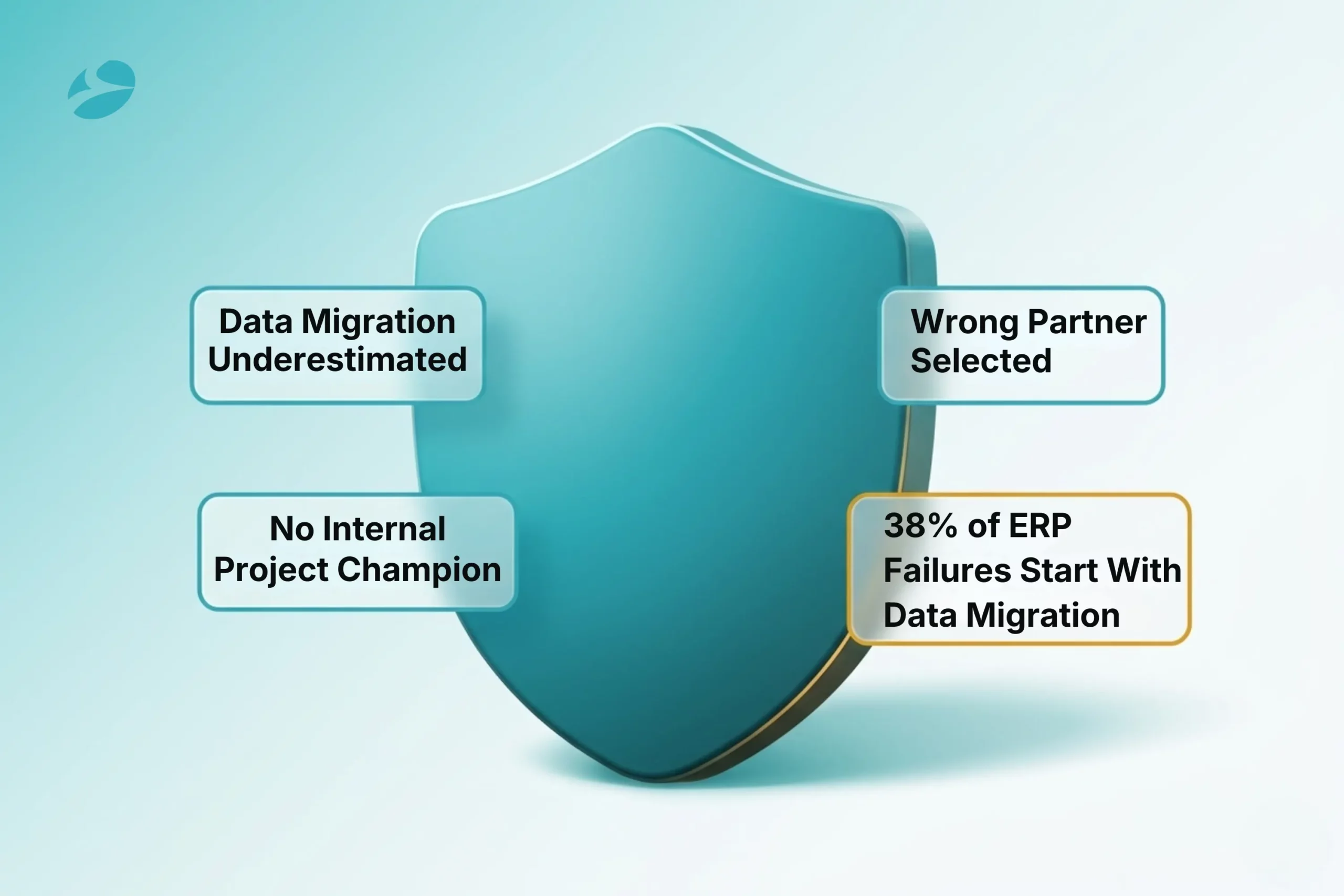
Choosing the wrong partner is the most expensive mistake in the implementation process. Here’s what to verify, regardless of which partner you’re evaluating.
Odoo Ready Partner certification. Certified partners have demonstrated delivery competency and passed technical examinations on the Odoo platform. This is a verified credential, not a marketing claim.
Industry-specific references. An Odoo partner with manufacturing experience doesn’t automatically understand wholesale distribution. Ask for two or three references from companies your size in your industry. Call them. Ask how the partner handled problems, not whether problems existed, because they always do.
Documented methodology. A serious implementation partner has discovery templates, RACI matrix frameworks, change request forms, go-live runbooks, and hypercare protocols documented and available to share. If a partner can’t show you their methodology, they’re improvising on your project.
Hypercare terms in the contract, not in the pitch. Response time SLAs, scope of post-go-live support, and what happens when something breaks in week two of live operation should be written into the agreement before work starts. Verbal commitments during the sales process are not enforceable.
ISO 27001 or equivalent for data security. Your implementation exposes financial data, customer records, HR information, and operational details to an external team. ISO 27001 certification means information security protocols are audited independently, not self-declared.
BiztechCS is an Odoo Ready Partner with 25+ certified Odoo experts, 19+ years of ERP delivery, ISO 27001 certification, and a 98% client retention rate across manufacturing, distribution, retail, and professional services implementations.
No vendor blog says this plainly: the first weeks on a new ERP are difficult. Productivity drops 20–40% during the initial adoption period across nearly all implementations. That’s not a sign something went wrong, it’s the learning curve for a business-wide system change.
Days 1–30. Transaction volumes are lower than normal while users build fluency. Edge cases surface that staging didn’t replicate. Some workflows that looked correct in UAT reveal gaps under real data conditions. The implementation partner should be reachable on short response times daily. This window is not the time for a partner to hand off and disappear.
Days 31–60. The team starts building real confidence. Transaction speed approaches pre-implementation baseline. Retraining sessions address the gaps that real usage uncovered. Performance monitoring catches any technical optimization needed.
Days 61–90. Most businesses return to baseline productivity in this window. The efficiency gains the implementation was supposed to deliver, faster financial close, reduced manual reconciliation, cleaner inventory visibility, start to become measurable. The first enhancement requests come in based on what the team has learned from real operation.
Organizations that achieve the 150–400% ROI that ERP implementations can deliver don’t get there because they rushed go-live. They get there because they planned stabilization, maintained partner involvement through hypercare, and gave their teams the support structure to actually adopt the system.
That payback requires getting the implementation right, not just getting it done.
1
For a small business (10–50 users, 3–5 core modules), plan 1–3 months. For a mid-market company (50–200 users, multiple departments), plan 4–9 months. For an enterprise implementation (200+ users, multi-site, complex integrations), plan 9–18 months. These are realistic timelines for a well-run project. Compressed timelines cost 20–50% more and increase failure risk significantly. Any partner promising a complex mid-market implementation in under 3 months is either scoping it narrowly or underestimating it.
2
Odoo licensing typically represents 15–30% of your total Year 1 investment. The remaining 70–85% covers implementation services, customization, data migration, training, integrations, and post-go-live support. A 30-user mid-market implementation with a full-scope cost breakdown: core implementation $55,000, integrations $12,000, data migration $8,000, training $6,000, hosting $2,400, annual licensing $13,464, approximately $97,000 Year 1 total. Get a full-scope quote before budgeting, not just a licensing quote.
3
Change management failures account for 42% of ERP implementation failures, more than data migration issues, more than technical problems, more than partner selection. People resist new systems, workarounds persist, and adoption stalls when the “why” of the implementation isn’t communicated with organizational credibility. The practical fix: appoint an internal project champion with decision-making authority who owns adoption and communication across the organization. The implementation partner owns the technical delivery, the champion owns the people side.
4
Ask for three client references from businesses your size in your exact industry who went live in the past 18 months, then call them. Ask how the partner handled problems (there are always problems). Request methodology documentation, not a pitch deck. Confirm that post-go-live hypercare support terms are in the contract with defined response times. Verify Odoo Ready Partner certification. Ask whether the partner runs a dedicated development environment phase before staging. Partners who skip it find data quality issues in staging, where fixing them costs more and pressure to cut corners is higher.
5
Expect a 20–40% productivity drop in the first 1–2 weeks. This is normal and universal, not a sign the implementation failed. Most businesses return to baseline productivity within 60–90 days. The businesses that recover fastest keep the implementation partner on short response times for at least 30 days post-go-live, have trained super-users available for daily peer support, and set realistic performance expectations internally before go-live rather than adjusting them after.
ERP
Odoo
 13
13

By Uttam Jain
ERP
Odoo
21
By Uttam Jain
ERP
25
By Uttam Jain