28
28
Odoo Enterprise Customization: Advanced Features That Give Businesses a Competitive Edge

 5 min read
28
5 min read
170,000+
Businesses worldwide running Odoo as of January 2026, with 13,000 new clients added per month
20%
Average decrease in operational costs that Odoo Enterprise businesses report within the first year of deployment
35%
Improvement in task management and project speed reported by Odoo Enterprise implementers in 2026
12–20 months
Typical ROI payback window for mid-market Odoo Enterprise implementations, driven by labor savings and automation
Most Odoo deployments never use more than a third of what the platform can actually do. That’s not an Odoo problem. It’s a customization gap, and Odoo Enterprise features exist specifically to close it.
Not because the features aren’t there. Because the teams running the system haven’t gone past the default module configuration, and neither has their implementation partner. They’re running Odoo the way most businesses run Excel: they know how to enter data, but the automation, the custom logic, and the integration layer that would actually change how the business competes? Untouched.
The businesses pulling ahead treat Odoo Enterprise customization as a strategic capability, not an IT project. They’ve built workflows the platform doesn’t ship with out of the box. They’ve connected Odoo to every system their operation depends on. And they’ve done it in a way that survives every version upgrade without a cleanup project on the other side.
This article maps what’s available, what’s achievable at each level, and how to build your customization stack without creating a technical debt problem that costs more to fix than it was worth to build.
These terms get used interchangeably, and that confusion creates misaligned expectations before a single line of code is written. Scope calls go sideways. Budgets are set against requirements nobody fully understands. The post-go-live cleanup lands on whoever has to fix it.
Configuration is what happens inside the standard Odoo interface. It covers settings, module activation, default workflows, user roles, approval chains, and product categories. It doesn’t require code. Any operations manager can learn to configure Odoo without touching a single line of Python. For a large share of standard business processes, configuration alone gets you most of the way there.
Customization goes further. It means changing how Odoo behaves beyond what the settings panel allows — adding fields that don’t exist, rebuilding workflows the standard modules don’t support. Sometimes that means wiring Odoo into external systems entirely. Sometimes it means building new modules for processes the platform was never designed to handle. That work happens through Odoo Studio (Enterprise’s no-code layer) or through Python development.
Getting this distinction wrong at planning is how businesses end up with systems that are half-configured and half-customized, with no clear ownership of which is which, and no one who can answer what happens at the next Odoo upgrade.
| Parameter | Configuration | Customization |
|---|---|---|
| Who does it | Operations manager, IT admin | Developer, Odoo partner |
| Tools | Settings, standard Odoo interface | Odoo Studio, Python modules, APIs |
| Upgrade impact | None | Requires testing and updates per upgrade |
| Time to implement | Hours to days | Days to months |
| Scope | Standard features | Anything beyond standard |
Odoo Community Edition allows both. Enterprise unlocks the layer in between. Enterprise unlocks a layer that Community doesn’t give you. Studio puts genuine customization capability, form redesigns, approval workflows, automated actions in the hands of the operations team without a development ticket. The expanded API access gives integration architects cleaner ground on the other end. Most of the practical competitive advantage comes from connecting those two.
Don’t think of Odoo Enterprise customization as a flat menu of options. It’s a four-layer stack. Each layer requires different skills and involves different people, they don’t collapse into one another.
1
The drag-and-drop customization layer included with every Enterprise license. Operations managers and HR leads work here, custom fields, modified views, approval flows. No developer required.
2
Configuration that goes beyond Studio’s drag-and-drop. Adding Python business logic to existing modules, overriding specific behaviors, writing simple automation scripts. Power users with a technical background or junior Odoo developers operate here.
3
New functionality that Odoo doesn’t provide out of the box. Industry-specific compliance logic, complex billing rules, proprietary workflow steps that match how your specific business runs. Senior Odoo developers own this layer.
4
Odoo connects to every other system in your ecosystem: payment gateways, 3PL systems, eCommerce platforms, CRMs, WMS, EDI partners. Integration architects own this layer.
Community Edition gives you access to Layers 3 and 4. But without Studio (Layer 1), every customization, including changes a non-technical manager should handle themselves, requires a developer. That’s not just inconvenient. It’s a cost multiplier across the entire life of the system.
Enterprise’s layered stack means each team member works at their own depth. The operations manager adjusts forms and approvals in Studio. The Odoo developer builds the custom compliance module. The integration architect wires Odoo to the external EDI system. Nobody waits for someone else to make basic changes, and nobody’s writing Python to solve a problem Studio already handles.
Figuring out which layer fits your workflow?
Studio is the most underused feature in Enterprise deployments. It comes with every Enterprise license, and it handles a meaningful share of the customization requests that typically become development tickets.
What Studio covers:
Studio doesn’t do everything. Conditional pricing calculations, complex manufacturing scheduling logic, external API integrations, and anything touching the core accounting or legal modules – that’s development work. Studio’s value is in how much it covers before you get there.
A good rule before raising a development ticket is to open Studio first and test whether the change can be built without code. In our experience across Enterprise deployments, somewhere between 20% and 30% of “customization requests” are actually Studio tasks. The development budget gets preserved for the work that genuinely needs it.
When Studio reaches its limit, the next layer is custom module development. That means writing Python code that extends or overrides Odoo’s behavior using its ORM inheritance model.
This is where industry-specific competitive advantages get built. A standard Odoo inventory module handles purchasing and stock. A custom Odoo module on top of it handles your specific QC approval flow, your three-tier supplier qualification process, your regulatory lot traceability requirement. Standard Odoo doesn’t know about those. Your custom module does.
The inheritance architecture matters more than most buyers realize.
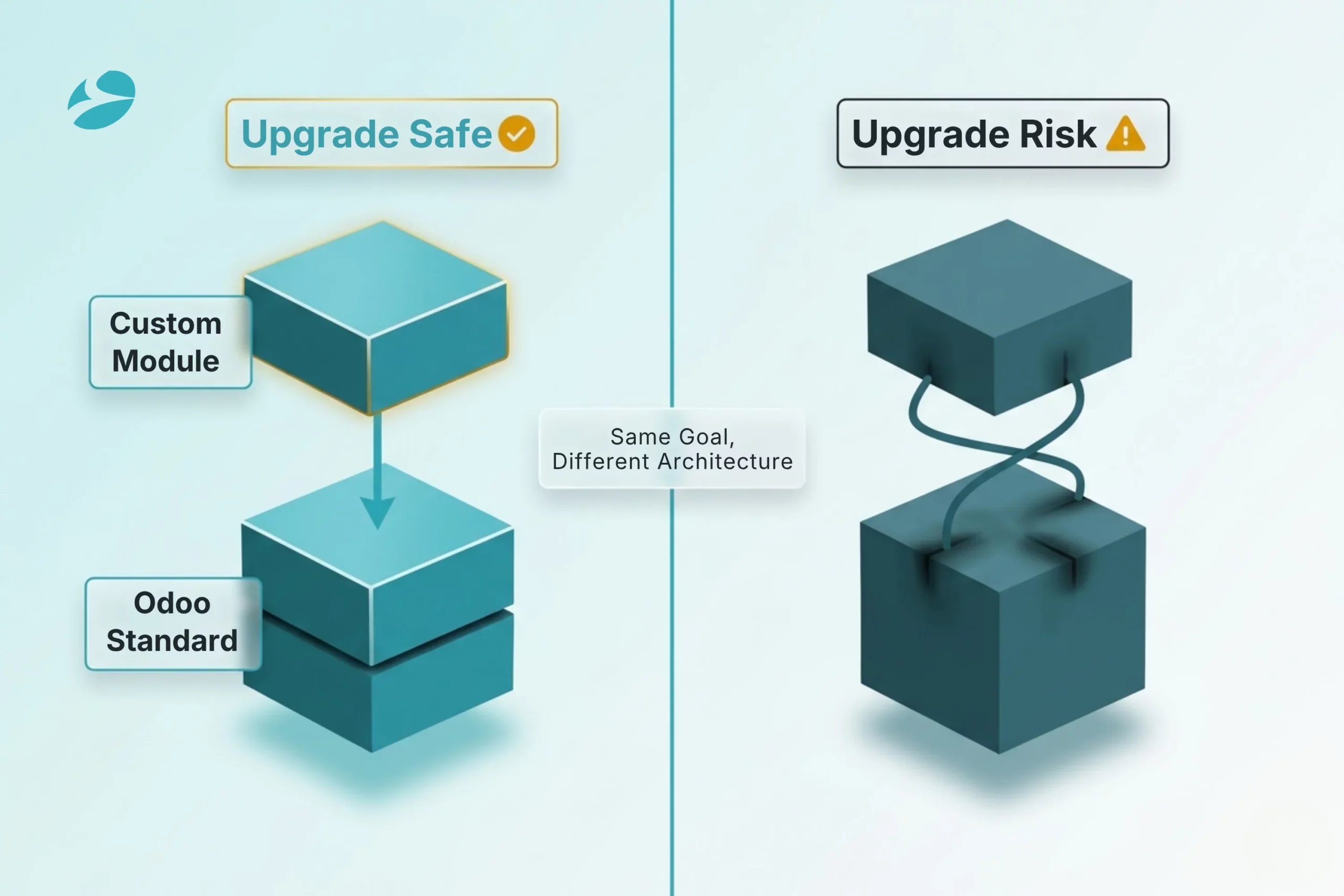
Odoo’s development model is designed for extension, not modification. The correct approach is to create a new module that inherits from the standard module and adds or overrides specific behaviors. What that gives you:
The wrong approach, which a surprising number of implementations use, is patching core Odoo code directly. It works until the next version upgrade, at which point every patched file becomes a conflict — and they don’t surface one by one. Businesses that inherit these deployments don’t spend six months building. They spend it undoing.
What well-built custom Odoo modules typically cover for mid-market businesses:
BiztechCS has built this kind of work for manufacturers and distributors across three continents. Production-grade, upgrade-safe, built to stay functional through Odoo’s annual version releases, not rebuilt from scratch each time.
Odoo Enterprise’s 2025 and 2026 updates introduced a set of AI-driven capabilities that go well beyond standard automation. These aren’t checkbox features. The ones that actually change workflow behavior are worth understanding before you assume your current process is the only way to run it.
Smart inventory replenishment: Odoo’s AI layer analyzes historical sales data, seasonality patterns, and lead time variability to suggest reorder quantities. The customization layer is where this gets useful, defining AI thresholds per product category, adjusting confidence levels, overriding recommendations with business-specific rules that the model doesn’t know about.
AI-based document scanning: Vendor bills, receipts, expense documents; Odoo reads them and populates fields automatically. The system improves from corrections. What you customize: which fields get auto-populated, which need a human check before posting, how exceptions get routed when the confidence is low.
Predictive sales forecasting: The Enterprise forecasting module projects demand by product, region, and channel using machine learning. Connecting that forecast output to your purchasing module, so replenishment triggers on forecast signals rather than actual orders – is a customization step that most deployments skip and then regret.
Communication AI: Automated email categorization, smart reply suggestions, task creation from email threads. For businesses running customer service through Odoo’s helpdesk, the response time impact is real and measurable.
Most articles about Odoo Enterprise customization skip the AI layer entirely. That omission matters more than it looks. The businesses building custom rules on top of these features, defining thresholds, wiring forecast signals into purchasing triggers, are operating at a different level from those running the same manual reorder calculations they were five years ago.
AI features in Enterprise deliver the most value when customized to your own data patterns, not just switched on. We recommend a 60-90 day baseline period after deployment before locking in AI thresholds. Let the system learn your data first. Then define the rules.
Odoo doesn’t run in isolation for most mid-market businesses. It has to exchange data with whatever else is running, eCommerce platforms, 3PL providers, payment processors, your CRM, niche industry tools. Getting that right is usually where the ROI shows up fastest.
Odoo’s integration architecture gives you several approaches depending on what you’re connecting:
REST API and JSON-RPC: Odoo’s full REST API lets external systems read and write directly products, orders, inventory, invoices, and customers. Custom API controllers extend that surface to include your own module data.
Webhook-based triggers: Outbound webhooks fire when specific Odoo events happen. Order confirmed, invoice paid, shipment dispatched — data gets pushed to external systems in real time, no polling required.
Pre-built connectors: Odoo’s AppStore and Enterprise package include native integrations for Magento, Shopify, Amazon, WooCommerce, payment gateways (Stripe, PayPal, Adyen), and major shipping carriers. Customization extends these connectors to handle your specific data mappings and exception logic.
EDI for manufacturing and logistics: Custom EDI parsers built as Odoo modules handle supplier, customer, and logistics partner data in standard formats (X12, EDIFACT), translating them into Odoo records without manual intervention.
In a documented life sciences implementation, Odoo’s integration layer cut billing processing time by 35% by eliminating the manual data entry step between the client’s external systems and Odoo’s finance module. Across mid-market implementations, businesses consistently report a 35% improvement in process speed once manual handoffs between systems are replaced with API-driven automation.
If your current systems don’t talk to Odoo well, or don’t talk to it at all,
Odoo Enterprise’s base modules handle common workflows across industries. The competitive advantage comes from the Odoo customization services built on top of those base modules. Here’s a breakdown of what Odoo customization services typically look like by vertical, and the outcomes businesses actually measure.
| Industry | Customization Example | Business Outcome |
|---|---|---|
| Manufacturing | Custom MRP rules, QC hold workflow, production KPI dashboard | Real-time floor visibility; QC delays caught before shipment |
| Distribution | Multi-warehouse auto-routing, carrier API, batch picking logic | Reduced pick errors; carrier cost optimization per shipment |
| Professional Services | Project-based invoice triggers, SLA escalation, utilization tracking | Faster billing cycles; no missed billable hours |
| Food & Beverage | Lot traceability, expiry alerts, POS custom product flows | Regulatory compliance; reduced waste |
| Retail / eCommerce | Shopify sync, custom return logic, loyalty program integration | Unified inventory across channels; customer lifetime value tracking |
The pattern across all of these: the standard Odoo module gets you 70-80% of the way. The custom layer handles the 20-30% that makes your operation defensible. Those are the workflows your competitors can’t replicate because they’re built specifically for how your business runs, not how Odoo ships by default.
Before building any customization, whether through Studio or code, run through this list. The businesses that skip it are the ones who arrive at a major Odoo version upgrade with a system that needs a full rebuild before it can move forward. That’s an expensive conversation nobody wants to have two years in.
Before you build:
1
Yes, through Odoo Studio. Studio handles a meaningful share of Odoo ERP customization tasks: custom fields, modified form views, automated approval workflows, scheduled reports, and electronic signature flows. No developer access is needed for any of that. Where Studio reaches its limit, complex business logic, external integrations, industry-specific compliance rules, development work is required.
2
Only code-based customizations affect upgrades, and the impact depends entirely on how the code is written. Customizations built using Odoo’s ORM inheritance model typically require only targeted review and testing per upgrade. Customizations that patch core Odoo files require full conflict resolution at every upgrade. That’s the technical debt pattern to avoid. Studio customizations are stored in the database and aren’t affected by code upgrades at all.
3
4
Studio customization carries no additional development cost beyond the Enterprise license. It’s a built-in tool. Code-based Odoo customization services vary significantly by scope: a simple custom field with business logic might be a few hours of development work, while a full custom module for an industry-specific compliance workflow could be 80-200 development hours. Integration customizations typically run 40-120 hours depending on the complexity of data mapping and exception handling. A reputable Odoo Ready Partner will scope this work based on a discovery session before quoting.