17
17
Odoo Migration Services: How to Move Your ERP Data Without Losing a Single Record

 5 min read
17
5 min read
38%
Of ERP implementations that fail trace back to poor data migration as a primary root cause — not the platform, not the team, the transfer itself
64%
Of data migration projects exceed their forecast budget; 54% overrun on time — making scoping accuracy the single most important pre-migration deliverable
$5,600/min
Enterprise downtime cost during an unplanned ERP cutover extension (Gartner baseline) — a 6-hour unplanned outage costs $2M+ before revenue impact is counted
+25%
Odoo subscription surcharge applied to instances still running v16 or earlier as of April 2026 — the financial cost of delaying a version upgrade past the EOL window
Most Odoo migrations go wrong in the same place. Not in the planning phase, not during testing, and not at go-live. They go wrong in the hours after go-live, when something breaks quietly. A filestore attachment that didn’t travel with the database. A custom module throwing errors on the new version. A financial balance that closed at zero in the old system and opened wrong in the new one.
That’s when the real cost shows up.
38% of ERP implementation failures trace directly to poor data migration. Not bad software, not a wrong platform choice, a transfer that didn’t work the way anyone expected.
The pattern is consistent enough that the failure modes are predictable. Every major one has a prevention protocol. This article covers what a serious Odoo migration service actually looks like: the four migration types, the five risks that don’t appear in generic checklists, and the validation process that separates a migration partner from a migration vendor.
If they’re general, expect the engagement to match.
The term gets used to describe four different types of work. Each carries its own complexity profile, cost range, and risk pattern. Getting clarity on which one applies changes everything about how you plan it.
Odoo version upgrades are the most common engagement. Businesses on v14, v15, or v16, all now end-of-life, need to move to v17, v18, or v19. This isn’t optional for much longer. Odoo began charging a 25% subscription surcharge for instances still on v16 or earlier as of April 2026. The technical wrinkle: Odoo’s upgrade service migrates the core database but explicitly does not migrate custom modules. Every customization your team has built, or paid someone to build, must be reviewed, refactored, and retested against the new version. That work is the partner’s responsibility, not Odoo’s.
On-premise to cloud migrations move a self-hosted Odoo instance to Odoo.sh or a managed cloud environment. The trap here isn’t the database, it’s the filestore. Attachments, uploaded documents, images linked to product records, and invoice PDFs live in a separate file directory, not inside the database dump. Backing up and migrating the database without migrating the filestore is the single most common source of silent data loss in Odoo migrations. Files don’t disappear with an error. They just become unreachable links.
Cross-ERP migrations cover businesses moving from QuickBooks, SAP Business One, Microsoft Dynamics, NetSuite, Tally, or spreadsheets into Odoo for the first time. These engagements involve the most data transformation work, mapping flat-list structures to Odoo’s relational model, defining which historical records to migrate in full vs. archive, and writing ETL scripts for source systems that don’t export cleanly. Timeline: 4–8 weeks for a small business, 3–6 months for a multi-entity enterprise.
Community to Enterprise upgrades are technically lower-risk than the others but require careful module mapping. Odoo Community and Enterprise have different module sets. Some workflows that work in Community don’t have direct Enterprise equivalents; they’re replaced by more capable versions that need to be configured, not just activated.
Generic migration checklists say “validate your data” and “test your custom modules.” That’s accurate but useless without specifics. Here’s what actually goes wrong — and what prevents it.
The filestore is separate from the database. It holds every attachment your team has ever uploaded to Odoo: vendor invoices, customer contracts, product images, delivery confirmations, payslips. When someone backs up the database and calls it a migration, the filestore doesn’t move with it.
The failure is silent. Records exist, but any field linking to a file returns a broken link instead of a document. Three years of vendor invoices are effectively gone. The only fix is a restore from backup and a repeat migration — during which the business either runs manually or waits.
The filestore must be migrated as a separate, verified step. Confirm which directories need to move. Verify the file count before and after. Test a sample of file links before signing off on go-live.
A parallel run means running the old system and the new system simultaneously for a defined period — processing real transactions in both, comparing outputs, and using that window to catch discrepancies before anyone depends exclusively on the new system.
It’s the gold standard for risk reduction. Nearly no one does it, because it takes more time and asks your team to work in two systems at once. Most migrations go straight from staging tests to production cutover. That’s the decision that turns a small discrepancy into a production incident.
A parallel run doesn’t have to be months. Two weeks of dual-entry on your highest-risk workflows — accounts payable, sales order management, inventory, catches problems that staging environments miss because they use production data patterns.
Every migration plan should have a rollback trigger defined before cutover starts. Not “if something goes wrong, we’ll roll back.” That’s not a plan, that’s a reaction.
A rollback decision matrix defines: what specific failure conditions trigger rollback, who has authority to call it, what the maximum acceptable extension window looks like, and what data recovery steps apply if partial records were written to the new system before rollback. Without this, a 6-hour cutover that hits a problem at hour 4 becomes a leadership debate about whether to continue or restore. The debate burns time. The business is bleeding at rates between $5,600 and $9,000 per minute in documented enterprise downtime costs.
Define the trigger before you start.
Most migration guides say “test your custom modules.” What they don’t say: Odoo’s official upgrade service doesn’t touch them. Odoo migrates the standard database schema and core module data. Everything custom is the partner’s job.
For version upgrades, each custom module needs to be checked against the new version’s API, renamed fields, deprecated methods, view structure changes. In v17+, “tree” views became “list” views. A small change that breaks every affected module. The correct approach is a module-by-module compatibility matrix built before development starts, not a blanket “test it and see” after the migration runs.
Cost to rebuild a custom module: $3,000–$20,000 depending on complexity. Cost to discover a critical module doesn’t work post-go-live: the cost of whatever business process it supports going offline, at emergency development rates.
Payment gateways, bank feeds, shipping connectors, and eCommerce platform integrations don’t automatically reconnect after a migration. They need to be re-authenticated and end-to-end tested in the production environment, not just staging, where credentials and API endpoints differ.
This is almost always the last item on a migration checklist and the one most likely to fail silently. A payment gateway that wasn’t reconnected doesn’t throw an error when you log into Odoo. It throws an error when your first customer tries to pay.
Build an integration inventory before the migration starts. Document every external system connected to Odoo, the authentication method, the connection owner, and the end-to-end test case. Sign off on each one before go-live.
The difference between a migration that finishes on time and one that becomes a recovery project is almost always visible in the pre-migration phase.
1
2
3
4
5
Most migration sign-offs happen too early. The database was restored, Odoo loaded, a quick click-through showed records were present. That’s a visual check, not validation.
A migration is validated when these five checkpoints pass.
Record count reconciliation. Pull a count from every major table (customers, vendors, products, open sales orders, open invoices, inventory locations) in the old system before cutover and in the new system after. The numbers should match exactly for records in scope. If they don’t, find out why before declaring done.
Financial balance reconciliation. The trial balance should match between old and new. Opening account balances, bank reconciliation, and A/R and A/P aging reports need to compare cleanly against the pre-migration snapshot. A single-cent discrepancy in accounting is worth investigating — in practice, accounting discrepancies almost always indicate a structural data mapping issue, not a rounding error.
Workflow smoke tests. Create a test sale order. Process a payment. Run a stock transfer. Generate a purchase order and receive it. These aren’t edge cases; they’re the transactions your team runs hundreds of times per week. If any fail in the new environment, the migration isn’t done.
Report output comparison. Print a sample invoice from the old system and the same invoice from the new system. Compare formatting, tax calculations, and totals. Print a stock valuation report and a balance sheet. Reports are where data structure changes show up visually in ways that a record-count check won’t catch.
Integration end-to-end testing. For every external system in the integration inventory: run a real transaction end-to-end, not just a connection test. A payment gateway that authenticates successfully but returns errors on actual transactions passes a connection check. It fails the test that matters.
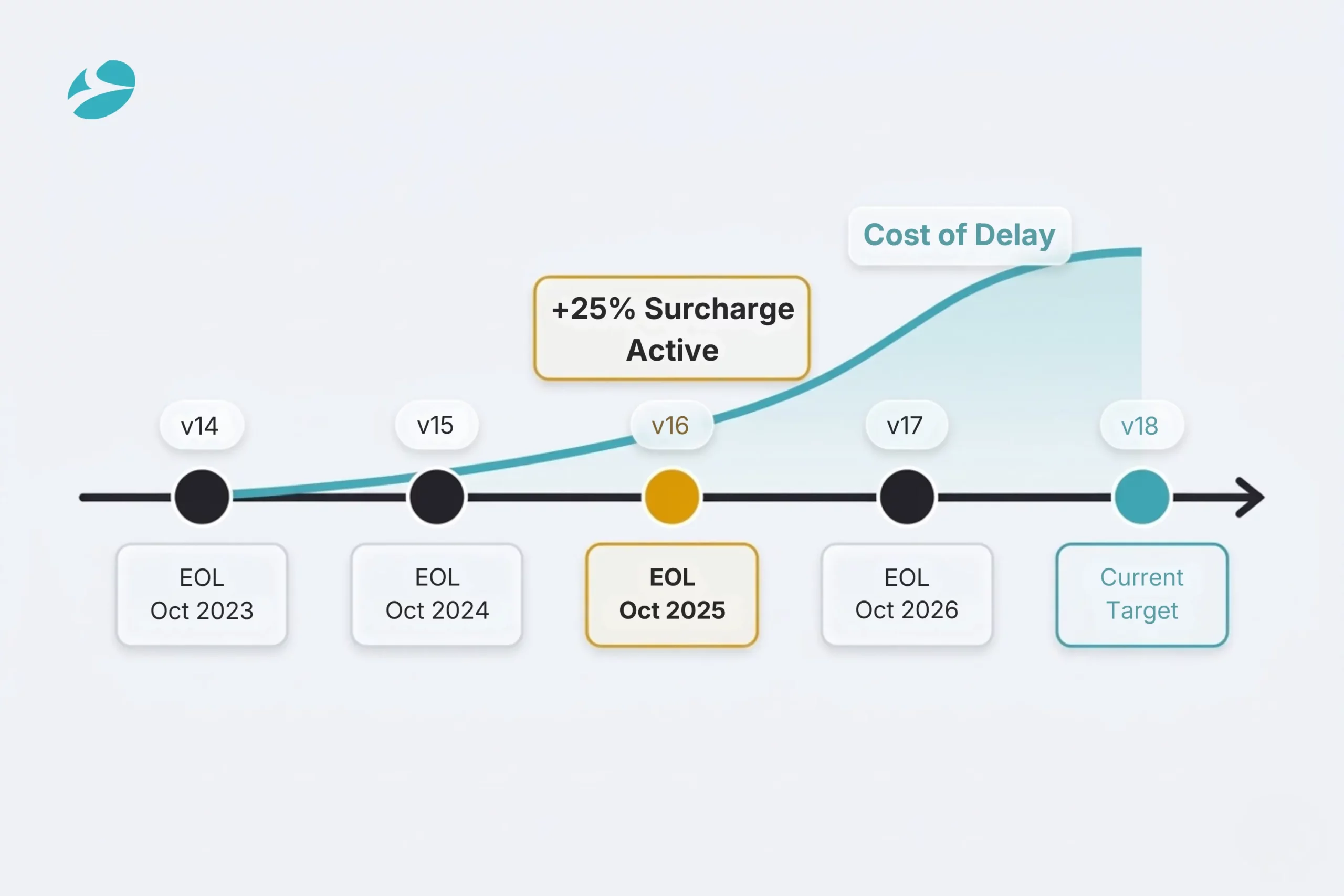
Businesses still running v14 or v15 are past the end-of-support window. Odoo applied the 25% subscription surcharge for v16 in April 2026, with v17 next in line after its October 2026 EOL date.
The longer the gap between the current version and the latest version, the more steps the migration requires. Odoo’s architecture requires sequential transitions — a business on v14 today migrating to v18 is doing a four-step upgrade technically. Skipping versions isn’t a time-saver; it’s a data integrity risk.
The cost trajectory works against waiting. Custom modules that need refactoring for v17 need refactoring again for v18 if the upgrade is delayed. Integrations that need reconnecting now will need reconnecting again later. Data quality issues that exist in v14 will migrate into whatever version they’re moved to, with more time to compound.
Businesses that migrate cleanly do it before they have to, on their own timeline, with a properly scoped engagement. Not under deadline pressure because a surcharge hit or a critical security patch isn’t available for their version.
1
2
3
4
5