

How to Build an Internal Knowledge Base Using LLMs — A Business Guide
 5 min read
5 min read
71%
Organizations that now regularly use generative AI in at least one business function (McKinsey, 2025)
26%
Increase in completed tasks when developers used an AI coding assistant, with less-experienced developers gaining the most (Cui et al., 2025)
$9.86B
Projected size of the retrieval-augmented generation market by 2030, up from $1.94 billion in 2025 at a 38.4% CAGR (MarketsandMarkets, 2025)
Every company already has the answers. They’re just scattered across a wiki nobody updates, a shared drive nobody can search, three Slack channels, and the head of the one person who’s on holiday this week. So people ask around, wait, guess, or redo work that was already done. The information exists. Finding it is the problem.
An internal knowledge base built on a large language model fixes the finding problem. An employee asks a question in plain English, “What’s our refund policy for enterprise customers?” and gets a straight answer drawn from your own documents, with a link to the source. No keyword guessing, no digging. And it’s not a toy: when researchers ran field trials of an AI coding assistant with nearly 5,000 developers at Microsoft, Accenture, and a Fortune 100 firm, task completion rose 26%, with the newest, least-experienced developers gaining the most.
We build these systems as an AI/ML development company, so let me be useful rather than breathless about it. Generative AI is now in regular use at 71% of organizations, so the real question isn’t whether to use it but how to use it well. Whether you’re scoping a project to build an internal knowledge base with LLM technology or just weighing it up, this guide covers how it works, how to build one, and, more importantly, the two unglamorous things that decide whether an LLM knowledge base for business earns trust or quietly gets abandoned. Because here’s the part the tool vendors won’t tell you: the hard part isn’t the AI.What an LLM Knowledge Base Actually Is
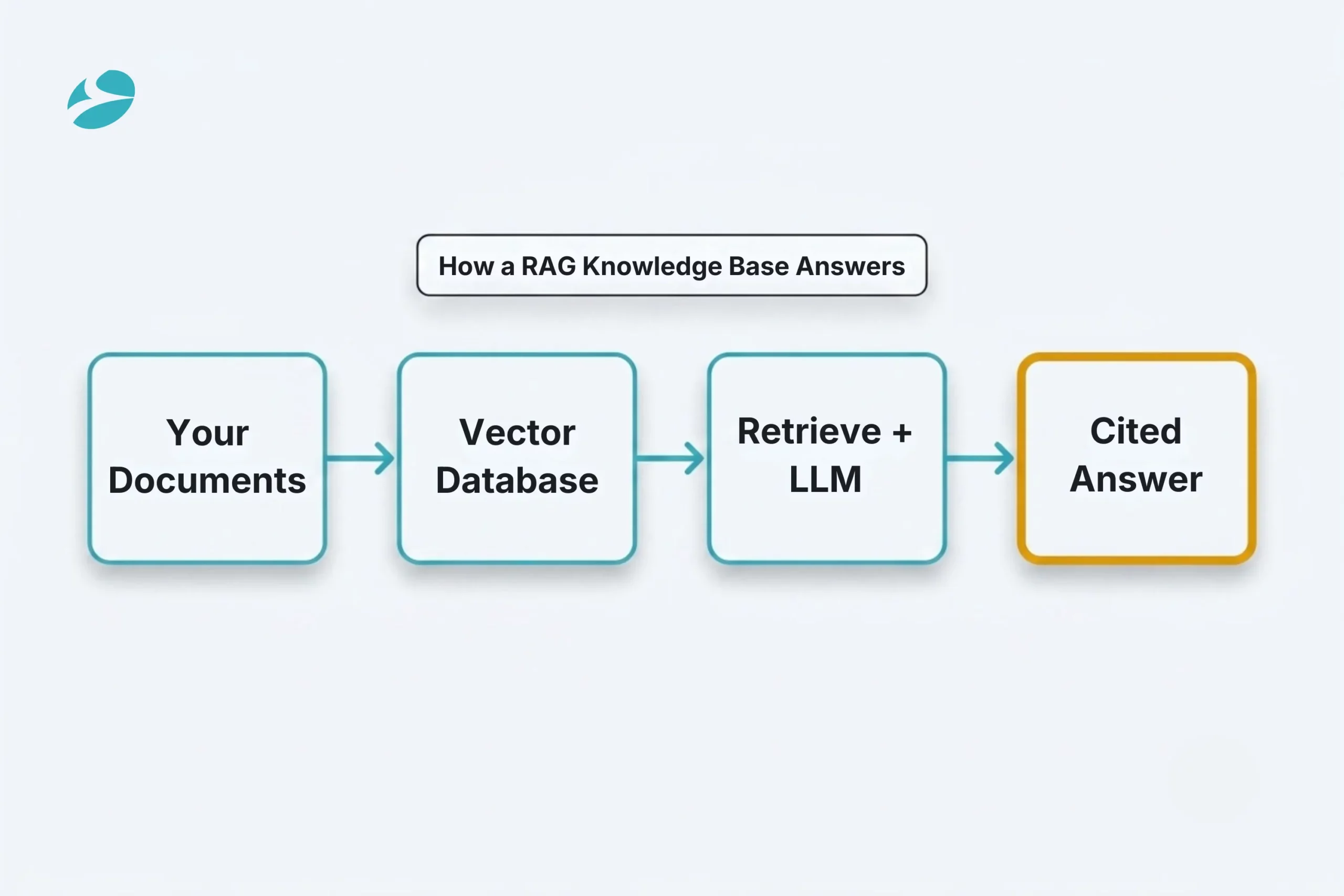
Strip the jargon away, and an LLM knowledge base is just a model that answers from your documents instead of from whatever it picked up on the open internet. The trick that pulls this off goes by the name RAG, retrieval-augmented generation. Worth understanding in plain terms, because every real decision you’ll make flows from it.
Picture a chain. Your documents get chopped into bite-sized passages. Each passage becomes a vector, basically a numeric fingerprint of what it means, and lands in a vector database. Someone asks a question? The system fingerprints the question the same way, hunts down the passages closest in meaning, and hands those to the LLM with a simple instruction: answer using only this. Out comes a natural answer built on your actual content, with a pointer to the document it came from.
That last bit matters more than it sounds. The model isn’t reciting something it memorized. It’s reading your live documents at the moment of the question and answering them. Which is exactly why this approach has taken off, and also where its risks come from, covered next.
The other way to teach a model your business is fine-tuning, retraining it on your data so the knowledge lives in its weights. For a knowledge base, that’s almost always the wrong tool, and it’s worth knowing why, so nobody sells you the expensive version.
RAG wins on the things a knowledge base actually needs. Freshness: update a document, and the system reflects it instantly, with no retraining, because it reads the document at query time. Traceability: RAG can show you the source behind an answer, which a fine-tuned model simply cannot. Cost: no retraining bill every time a price or policy changes. And security: your sensitive content stays in a controlled store and is only pulled in at the moment of a query, never baked permanently into a model.
To be fair, it isn’t a clean either-or. Fine-tuning earns its place for shaping how a model writes, the tone, the format, and the house style. It’s just the wrong tool for storing facts that keep changing. So the sensible default for an LLM knowledge base for business is simple: a strong base model, RAG for the knowledge, and fine-tuning only if you genuinely need to lock down the style of what comes out.
Want to build an internal knowledge base with LLM tech your team will actually trust? Here’s the thing: it’s less about clever code than about getting a handful of unglamorous steps right, in order. Here’s the order that works.
Start with the questions, not the technology. Pick one area that genuinely matters and write down twenty or thirty real questions your team asks, with the right answers next to them. That little set is your target now and your test later. Skip it, and you end up with something technically slick that nobody actually uses.
Audit and clean the source documents first. Everyone wants to skip this one. Nobody should. Walk your documents, mark which are current and authoritative, retire the stale and the contradictory, and note who’s allowed to see what. A knowledge base is never better than what you feed it.
Chunk, embed, and load the vector store. Break the cleaned documents into sensible passages, turn each into a vector, and load them into a vector database with their metadata intact. The chunking choices here quietly drive how good your retrieval feels later.
Wire up retrieval and the LLM, with grounding and citations. Connect the retriever to the model behind a prompt that insists on two things: answer only from the passages you were handed, and show your sources. That combination is what turns a confident-sounding guess into something a person can actually check.
Make access control mirror your document permissions. Filter what can be retrieved by who’s asking, enforced in the retrieval layer. More on why this one is non-negotiable in a moment.
Add guardrails and an honest “I don’t know.” Give the system permission to decline when the documents don’t cover a question, rather than inventing something confident. A knowledge base that admits a gap is far more trustworthy than one that papers over it.
Evaluate against your gold questions before you ship. Run your test set, check that the answers are faithful to the sources, and only launch when it passes. Then keep that test set to catch regressions as documents change.
Keep it updated. Documents drift. Build a habit of re-certifying sources and logging questions, so the knowledge base stays current instead of slowly rotting.
Here’s the uncomfortable truth that the vendor demos skip. The RAG pipeline is the easy, increasingly commoditized part. Two unglamorous things decide whether your knowledge base is an asset or a liability, and both are about governance, not models.
First, data hygiene. The very thing that makes RAG appealing, that it reads your live documents rather than memorizing them, is also where it bites you. It will answer, faithfully and without an ounce of judgment, from whatever it retrieves. A three-year-old policy. A draft nobody deleted. Two documents that flatly contradict each other. And a knowledge base that confidently cites the wrong document is worse than having none at all, because people believe it. Garbage in, confident garbage out.
The second is permission-aware retrieval, and it’s the highest-stakes risk almost nobody writes about. Vector databases don’t naturally know who’s allowed to see what. If you don’t enforce permissions in the retrieval layer, an employee can surface content from documents they should never see, such as salaries, a pending acquisition, someone’s HR file, just by asking the right question. Bolting security onto the app layer afterward isn’t enough; the filtering has to happen before the model ever sees a chunk.
Put those two together, and you reach the insight that should shape your whole project. Choosing RAG is really a decision to invest in document governance and permission-aware retrieval first. The vector database is the straightforward twenty percent. Which means building an internal knowledge base is, honestly, a knowledge-governance project with an AI front end, not an AI project with a document problem. Teams that grasp that build something people trust. Teams that don’t ship a confident, occasionally dangerous guess machine.

You don’t have to build all of this from scratch, and often you shouldn’t. There are three honest paths.
Buy an off-the-shelf tool when you have limited AI talent, fairly standard needs, and you want results in weeks. Good products handle most general use cases out of the box, and a vendor spreads the engineering cost across many customers. The trade-off is that you bend to the product’s assumptions, and you’re trusting their security model with your documents.
Build a custom system when the knowledge base is a genuine competitive advantage, when your compliance or security rules rule out commercial tools, or when you need integrations no product offers. Custom builds are real engineering and are priced accordingly, so go this route for the right reasons, not for novelty.
The hybrid path is usually right for mid-market companies. Buy the foundational pieces and build the twenty percent that’s specific to you, your data sources, your permission model, and your evaluation. That’s the sweet spot a good AI/ML development services partner steers you toward, instead of selling you either a rigid product or a year-long, from-scratch project. The goal isn’t the most impressive build. It’s the knowledge base your team actually trusts and uses.
1
RAG pulls your live documents at the moment someone asks and answers from them, so it stays current and shows its sources. Fine-tuning bakes your data into the model’s weights, where it slowly goes stale and can’t point to where an answer came from. For a knowledge base, you want RAG. Save fine-tuning for shaping tone or format, never for storing facts that change.
2
Three things together: ground every answer in retrieved documents and require citations, give the system an honest “I don’t know” for questions your documents don’t cover, and evaluate against a fixed set of test questions before launch and after every change. RAG reduces hallucination sharply, but only clean source documents and real evaluation keep it reduced.
3
You enforce permissions in the retrieval layer, so the system only ever fetches passages the person asking is cleared to see, before the model is even involved. Vector databases won’t do this for you, which is exactly why permission-aware retrieval has to be designed in from the start rather than patched on later. Of every control in the build, this is the one to get right.
4
Buy when your needs are standard and you want speed. Build when the knowledge base is a real differentiator, or when your security rules rule out commercial tools. For most mid-market companies, though, the honest answer is a blend: buy the foundation, build the slice that’s specific to your data and your permissions. Let how unusual your requirements actually are make the call, not how fun building sounds.
5
It can be if you design for it. Stay in control of where your documents and chunks get processed. Choose deliberately between a hosted model and a private deployment. Redact or simply leave out sensitive personal data. And enforce the access controls covered above. Safety here is a decision you make up front, not something you get for free.
Odoo
 9
9

By Uttam Jain
Odoo
11
By Uttam Jain
Artificial Intelligence (AI)
60

By Nandeep Barochiya